Built-in templates
Who this is for: anyone choosing a starting point.
What you can do after reading: pick the template that is closest to what you need and know exactly what it will produce.
To list them, run inventag templates list. To print one, run
inventag templates show <name>; add --resolved to see the result
after inheritance and defaults.
NAME                    KIND        SOURCE   DESCRIPTION
executive-summary       report      builtin  Short Word report with totals and tag compliance; Excel has one filterable sheet.
finops-cost-report      report      builtin  Standard layout with cost-allocation tag columns, checked against finops-cost-allocation.
standard-bom            report      builtin  Summary plus one sheet per service, with readable columns and every tag as a column.
finops-cost-allocation  tag-policy  builtin  Requires CostCenter, Owner, Project and Environment so spend can be allocated.
security-baseline       tag-policy  builtin  Requires Owner, Environment and DataClassification for security reviews.
ci-pipeline             config      builtin  Excel report plus tag-compliance JSON; exits with code 3 on tag policy violations.
org-multi-account       config      builtin  Assume a read-only role in each listed account and write one consolidated report.
single-account          config      builtin  Scan the account of your current credentials and write Excel and Word reports.

Search order (first match wins):
  1. project  ~/acme-infra/.inventag/templates  (not created)
  2. user     ~/.config/inventag/templates  (not created)
  3. builtin  ~/inventag-aws/inventag/templating/builtin
The samples on this page come from offline runs against mocked AWS (sample
data). The account and the acme-* resources are made up.
Report templates
| Name | Excel workbook | Word document |
|---|---|---|
standard-bom | Summary sheet, then one sheet per service. Columns: Account, Region, Service, Type, Name, ID, ARN, then one column per tag key found on that sheet. Header row frozen, with filter buttons. | Cover, summary, resources by service, tag compliance (if a policy is active), one table per service (up to 50 rows each), about this report. |
executive-summary | Summary sheet and one Resources sheet with every resource, no tag columns. | Cover, summary, resources by service, tag compliance (if a policy is active), about. No per-resource tables. |
finops-cost-report | Like standard-bom, but the tag columns are fixed to CostCenter, Owner, Project and Environment, plus a Tag Compliance sheet. | Cover, summary, tag compliance, resources by service, about. |
executive-summary and finops-cost-report both extends: standard-bom, so
they only list what is different. finops-cost-report also turns on the
finops-cost-allocation tag policy.
The header colour in all three is dark blue (1F3A5F) with white text.
standard-bom
Command: inventag --template standard-bom --create-excel --create-word --account-regions us-east-1
Sheets: Summary, ATHENA, DYNAMODB, EC2, EVENTS, IAM, KMS, LAMBDA, S3, VPC
Summary sheet:
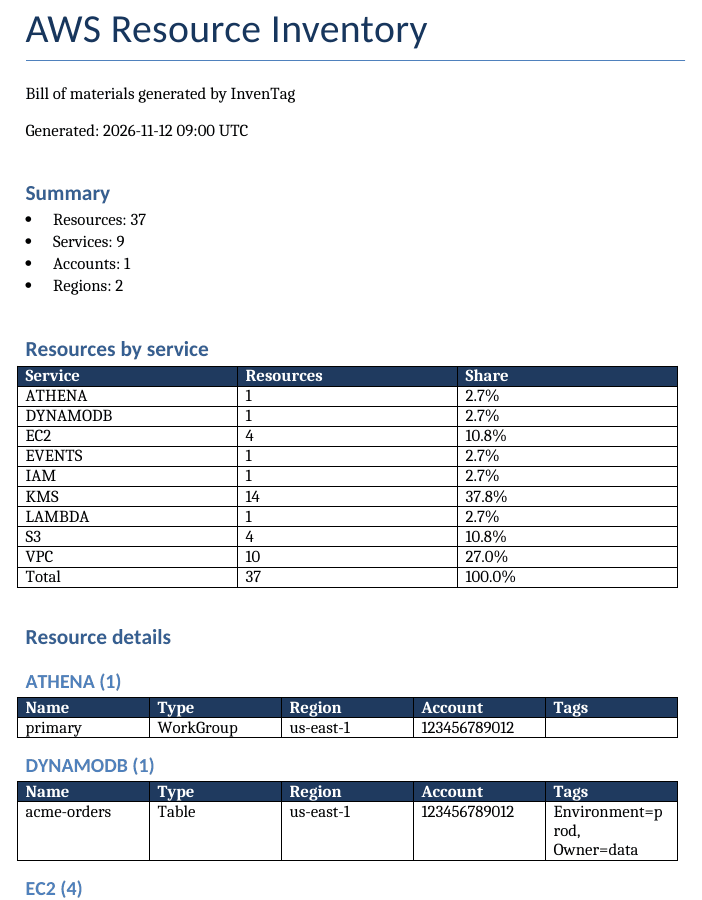
AWS Resource Inventory
Bill of materials generated by InvenTag
Generated: 2026-11-12 09:00 UTC
Accounts: 1 Regions: 2
| Service | Resources | Share |
|---|---|---|
| ATHENA | 1 | 2.7% |
| DYNAMODB | 1 | 2.7% |
| EC2 | 4 | 10.8% |
| EVENTS | 1 | 2.7% |
| IAM | 1 | 2.7% |
| KMS | 14 | 37.8% |
| LAMBDA | 1 | 2.7% |
| S3 | 4 | 10.8% |
| VPC | 10 | 27.0% |
| Total | 37 | 100.0% |
Sheets: Summary, ATHENA, DYNAMODB, EC2, EVENTS, IAM, KMS, LAMBDA, S3, VPC
S3 sheet, first rows:
| Account | Region | Service | Type | Name | ID | ARN | Tag: CostCenter | Tag: DataClassification | Tag: Environment | Tag: Owner | ... |
|---|---|---|---|---|---|---|---|---|---|---|---|
| 123456789012 | us-east-1 | S3 | Bucket | acme-app-logs | acme-app-logs | arn:aws:s3:::acme-app-logs | CC-1001 | internal | prod | platform | ... |
| 123456789012 | us-east-1 | S3 | Bucket | acme-data-lake | acme-data-lake | arn:aws:s3:::acme-data-lake | CC-2002 | prod | data | ... | |
| 123456789012 | us-east-1 | S3 | Bucket | acme-reports | acme-reports | arn:aws:s3:::acme-reports | 1234 | Production | finance | ... | |
| 123456789012 | us-east-1 | S3 | Bucket | acme-scratch | acme-scratch | arn:aws:s3:::acme-scratch | ... |
The sheet has 12 columns; the first 11 are shown.

Document outline:
- AWS Resource Inventory (title)
- Summary
- Resources by service
- Resource details
- ATHENA (1)
- DYNAMODB (1)
- EC2 (4)
- EVENTS (1)
- IAM (1)
- KMS (14)
- LAMBDA (1)
- S3 (4)
- VPC (10)
- About this report
A table from the document:
| Service | Resources | Share |
|---|---|---|
| ATHENA | 1 | 2.7% |
| DYNAMODB | 1 | 2.7% |
| EC2 | 4 | 10.8% |
| EVENTS | 1 | 2.7% |
| IAM | 1 | 2.7% |
| KMS | 14 | 37.8% |
| LAMBDA | 1 | 2.7% |
| S3 | 4 | 10.8% |
| VPC | 10 | 27.0% |
| Total | 37 | 100.0% |
Download the sample workbook (14 KB, sample data) and the sample Word report (37 KB, sample data)
executive-summary
Command: inventag --template executive-summary --create-excel --create-word --account-regions us-east-1
Sheets: Summary, Resources
Resources sheet, first rows:
| Account | Region | Service | Type | Name | ID | ARN |
|---|---|---|---|---|---|---|
| 123456789012 | us-east-1 | ATHENA | WorkGroup | primary | primary | arn:aws:athena:us-east-1:123456789012:workgro... |
| 123456789012 | us-east-1 | DYNAMODB | Table | acme-orders | acme-orders | arn:aws:dynamodb:us-east-1:123456789012:table... |
| 123456789012 | us-east-1 | EC2 | Instance | acme-web-1 | i-855a01aabe3d29d3a | arn:aws:ec2:us-east-1:123456789012:instance/i... |
| 123456789012 | us-east-1 | EC2 | Snapshot | snap-3585ce88e25ef1196 | arn:aws:ec2:us-east-1::snapshot/snap-3585ce88... |
Document outline:
- AWS Inventory Summary (title)
- Summary
- Resources by service
- About this report
A table from the document:
| Service | Resources | Share |
|---|---|---|
| ATHENA | 1 | 2.7% |
| DYNAMODB | 1 | 2.7% |
| EC2 | 4 | 10.8% |
| EVENTS | 1 | 2.7% |
| IAM | 1 | 2.7% |
| KMS | 14 | 37.8% |
| LAMBDA | 1 | 2.7% |
| S3 | 4 | 10.8% |
| VPC | 10 | 27.0% |
| Total | 37 | 100.0% |
finops-cost-report
Command: inventag --template finops-cost-report --create-excel --create-word --account-regions us-east-1
Sheets: Summary, ATHENA, DYNAMODB, EC2, EVENTS, IAM, KMS, LAMBDA, S3, VPC, Tag Compliance
S3 sheet, first rows:
| Account | Region | Service | Type | Name | ID | ARN | Tag: CostCenter | Tag: Owner | Tag: Project | Tag: Environment |
|---|---|---|---|---|---|---|---|---|---|---|
| 123456789012 | us-east-1 | S3 | Bucket | acme-app-logs | acme-app-logs | arn:aws:s3:::acme-app-logs | CC-1001 | platform | storefront | prod |
| 123456789012 | us-east-1 | S3 | Bucket | acme-data-lake | acme-data-lake | arn:aws:s3:::acme-data-lake | CC-2002 | data | prod | |
| 123456789012 | us-east-1 | S3 | Bucket | acme-reports | acme-reports | arn:aws:s3:::acme-reports | 1234 | finance | reporting | Production |
| 123456789012 | us-east-1 | S3 | Bucket | acme-scratch | acme-scratch | arn:aws:s3:::acme-scratch |
The Tag Compliance sheet and the Word section are shown in Example: FinOps cost-allocation tags.
Tag-policy templates
These are starting points. Change the keys and allowed values to match your own tagging conventions before you enforce them.
finops-cost-allocation
Checks the tags you need to split spend by team and project.
| Tag key | Rule |
|---|---|
CostCenter | Must match CC- followed by four digits, for example CC-1234 |
Owner | Any value |
Project | Any value |
Environment | One of prod, staging, dev, test, sandbox (any case) |
KMS aliases are out of scope, because aliases cannot carry tags.
Not verified against AWS: KMS aliases cannot carry tags.
Tags only appear in AWS cost reports after you activate them as cost
allocation tags in the AWS Billing and Cost Management console. InvenTag
lists resources and tags. It does not read your bill. The optional
--enable-cost-analysis adds cost estimates.
Not verified against AWS: tags appear in cost reports only after you activate them as cost allocation tags.
Not verified against real AWS: the cost estimates of --enable-cost-analysis.
security-baseline
Checks the tags that help during a security review or an incident: who owns this, how sensitive is it, and is it production?
| Tag key | Rule |
|---|---|
Owner | Any value |
Environment | One of prod, staging, dev, test, sandbox (any case) |
DataClassification | One of public, internal, confidential, restricted (any case) |
KMS aliases are out of scope. Passing this policy does not make anything compliant with any security framework; it only tells you whether these tags are present and valid.
Config templates
| Name | Scans | Produces | Notes |
|---|---|---|---|
single-account | The account of your current credentials, in us-east-1 | Excel and Word, standard-bom layout | Change regions to the regions you use. |
org-multi-account | Three example accounts, by assuming InvenTagReadOnly in each | Excel and Word, standard-bom layout, finops-cost-allocation policy | The account IDs are placeholders. InvenTag does not list your organization's accounts for you. |
ci-pipeline | The account of the pipeline's credentials, in us-east-1 | Excel and a tag-compliance JSON file | Exits with code 3 if a resource breaks the finops-cost-allocation policy. Scans accounts one at a time. |
inventag templates validate org-multi-account warns you while the
placeholder account IDs are still there.