Example: FinOps cost-allocation tags
Goal: a report for the FinOps (cloud financial operations) or finance team that shows, per resource, whether the cost-allocation tags are present and valid.
You need: read-only credentials. Tags only appear in AWS cost reports after you activate them as cost allocation tags in the AWS Billing and Cost Management console. InvenTag shows which resources carry them; it does not calculate costs.
Template
finops-cost-report (a report template) shows CostCenter, Owner, Project and
Environment as columns and turns on the finops-cost-allocation tag policy:
| Tag key | Rule in finops-cost-allocation |
|---|---|
CostCenter | CC- and four digits, for example CC-1234 |
Owner | Any value |
Project | Any value |
Environment | prod, staging, dev, test or sandbox |
If your cost centres look different, adapt the policy and keep the report:
format_version: 1
kind: tag-policy
name: our-cost-tags
description: Our cost centres are five-digit numbers
extends: finops-cost-allocation
spec:
  required_tags:
    - key: CostCenter
      pattern: "[0-9]{5}"
Command
inventag --template finops-cost-report --create-excel --create-word --account-regions us-east-1
# with your own policy:
inventag --template finops-cost-report --template our-cost-tags --create-excel
Output
inventag - WARNING -   - No account specification method provided. Using default AWS credentials.
Wrote bom_output/tag_compliance_20261112_090000.json
Wrote bom_output/multi_account_bom_20261112_090000.docx
Wrote bom_output/multi_account_bom_20261112_090000.xlsx
Tag policy 'finops-cost-allocation': 1 of 23 resources compliant (4.3%), 22 non-compliant, 14 out of scope.
Sheets: Summary, ATHENA, DYNAMODB, EC2, EVENTS, IAM, KMS, LAMBDA, S3, VPC, Tag Compliance
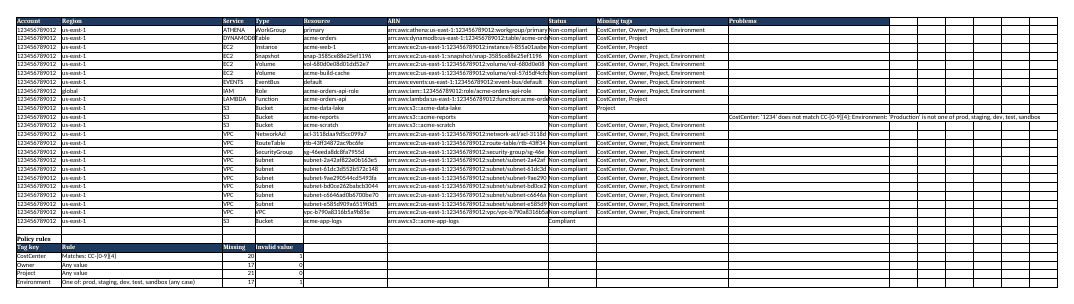
Tag Compliance sheet, first rows:
| Account | Region | Service | Type | Resource | ARN | Status | Missing tags | Problems |
|---|---|---|---|---|---|---|---|---|
| 123456789012 | us-east-1 | DYNAMODB | Table | acme-orders | arn:aws:dynamodb:us-east-1:123456789012:table... | Non-compliant | CostCenter, Project | |
| 123456789012 | us-east-1 | EC2 | Instance | acme-web-1 | arn:aws:ec2:us-east-1:123456789012:instance/i... | Non-compliant | CostCenter, Project | |
| 123456789012 | us-east-1 | EC2 | Volume | acme-build-cache | arn:aws:ec2:us-east-1:123456789012:volume/vol... | Non-compliant | CostCenter, Owner, Project, Environment | |
| 123456789012 | global | IAM | Role | acme-orders-api-role | arn:aws:iam::123456789012:role/acme-orders-ap... | Non-compliant | CostCenter, Owner, Project, Environment |
The Word document's Tag compliance section:
Document outline:
- Cost Allocation Tag Report (title)
- Summary
- Tag compliance
- Required tags
- Non-compliant resources
- Resources by service
- About this report
A table from the document:
| Tag key | Rule | Missing | Invalid value |
|---|---|---|---|
| CostCenter | Matches: CC-[0-9]{4} | 20 | 1 |
| Owner | Any value | 17 | 0 |
| Project | Any value | 21 | 0 |
| Environment | One of: prod, staging, dev, test, sandbox (an... | 17 | 1 |
The JSON file:
{
  "policy": "finops-cost-allocation",
  "description": "Requires CostCenter, Owner, Project and Environment so spend can be allocated.",
  "summary": {
    "checked": 23,
    "compliant": 1,
    "non_compliant": 22,
    "out_of_scope": 14,
    "percent_compliant": 4.3,
    "missing_by_key": {
      "CostCenter": 20,
      "Owner": 17,
      "Project": 21,
      "Environment": 17
    },
    "invalid_by_key": {
      "CostCenter": 1,
      "Owner": 0,
      "Project": 0,
      "Environment": 1
    }
  },
  "non_compliant_resources": [
    {
      "account": "123456789012",
      "service": "S3",
      "resource_type": "Bucket",
      "resource_id": "acme-reports",
      "arn": "arn:aws:s3:::acme-reports",
      "region": "us-east-1",
      "missing": [],
      "invalid": [
        "CostCenter: '1234' does not match CC-[0-9]{4}",
        "Environment: 'Production' is not one of prod, staging, dev, test, sandbox"
      ]
    }
  ]
}
Download the sample tag-compliance JSON (9 KB, sample data)
Next steps
- Send the Word document to budget owners. Its Tag compliance section lists the non-compliant resources.
- Track progress weekly: Run InvenTag in CI/CD.