Example: your own columns
Goal: one sheet with the columns your team actually reads, in the order you want.
You need: read-only credentials.
Template
.inventag/templates/team-sheet.yaml
format_version: 1
kind: report
name: team-sheet
description: One sheet, our columns
extends: standard-bom
spec:
  title: Platform team inventory
  columns:
    - { field: source_account_id, header: Account }
    - { field: service, header: Service }
    - { field: resource_type, header: Type }
    - { field: resource_name, header: Name }
    - { field: region, header: Region }
    - { field: raw_data.VolumeType, header: Volume type }
  tag_columns: [Owner, CostCenter, Environment]
  excel:
    layout: single-sheet
    single_sheet_name: Inventory
columnsreplaces the inherited list completely, so list every column you want.tag_columnsadds one column per tag key, aftercolumns. Useallfor every tag found, ornone.raw_data.<Name>reads a value straight from the AWS API response. It is blank for resources that don't have it. To find the names, run once withexcel.include_all_fields: true.source,sourcesanddetail_levelshow where each row came from. See the field list.
Command
Terminal
inventag templates validate team-sheet
inventag --template team-sheet --create-excel --account-regions us-east-1
Output
Output
OK ~/acme-infra/.inventag/templates/team-sheet.yaml (report 'team-sheet')
Output
inventag - WARNING -   - No account specification method provided. Using default AWS credentials.
Wrote bom_output/multi_account_bom_20261112_090000.xlsx
Sheets: Summary, Inventory
Inventory sheet, first rows:
| Account | Service | Type | Name | Region | Volume type | Tag: Owner | Tag: CostCenter | Tag: Environment |
|---|---|---|---|---|---|---|---|---|
| 123456789012 | EC2 | Volume | us-east-1 | gp2 | ||||
| 123456789012 | EC2 | Volume | acme-build-cache | us-east-1 | gp3 | |||
| 123456789012 | S3 | Bucket | acme-app-logs | us-east-1 | platform | CC-1001 | prod | |
| 123456789012 | S3 | Bucket | acme-data-lake | us-east-1 | data | CC-2002 | prod | |
| 123456789012 | S3 | Bucket | acme-reports | us-east-1 | finance | 1234 | Production | |
| 123456789012 | S3 | Bucket | acme-scratch | us-east-1 |
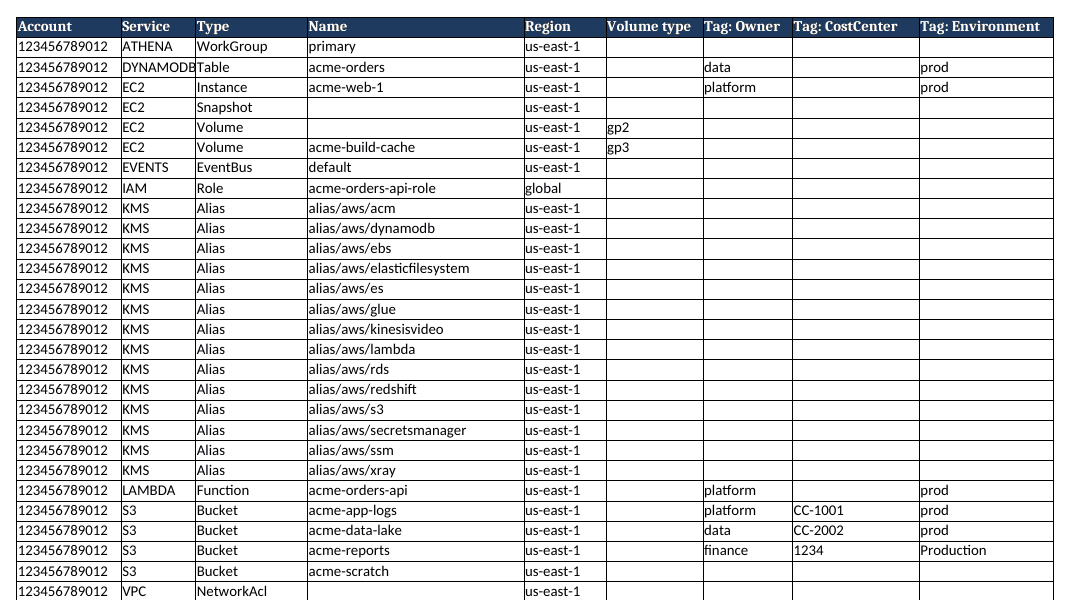
The header row is frozen and has filter buttons.
Tag mappings and service descriptions
--tag-mappings and --service-descriptions add columns to the default
workbook. With --template they add nothing until you list the column: add
- field: <column name> under columns (the name from your mapping file, or
service_description), or set excel.include_all_fields: true. tag_columns
shows raw tag values only. InvenTag logs a warning that names the missing
columns. With a layout file (--excel-template or --word-template), list the mapped
column under extra_fields. See
Configuration files.
Next steps
- All column fields: Template reference.