範例:FinOps 成本分攤標籤
目標: 為 FinOps(雲財務運營)或財務團隊生成一份報告,逐個資源顯示成本分攤標籤是否存在且有效。
你需要: 唯讀憑證。標籤只有在你於 AWS Billing and Cost Management 控制檯中將其啟用為成本分攤標籤之後,
才會出現在 AWS 成本報告中。InvenTag 顯示哪些資源帶有這些標籤。它不讀取你的帳單。可選的 --enable-cost-analysis 會新增成本估算。
未針對 AWS 驗證:標籤只有在你把它們啟用為成本分攤標籤之後才會出現在成本報告中。
未針對真實的 AWS 驗證:--enable-cost-analysis 的成本估算。
範本
finops-cost-report(一個報告範本)把 CostCenter、Owner、Project 和 Environment 顯示為欄,
並啟用 finops-cost-allocation 標籤策略:
| 標籤鍵 | finops-cost-allocation 中的規則 |
|---|---|
CostCenter | CC- 加四位數字,例如 CC-1234 |
Owner | 任意值 |
Project | 任意值 |
Environment | prod、staging、dev、test 或 sandbox |
如果你的成本中心格式不同,可以調整策略並保留報告:
.inventag/templates/our-cost-tags.yaml
format_version: 1
kind: tag-policy
name: our-cost-tags
description: Our cost centres are five-digit numbers
extends: finops-cost-allocation
spec:
  required_tags:
    - key: CostCenter
      pattern: "[0-9]{5}"
命令
Terminal
inventag --template finops-cost-report --create-excel --create-word --account-regions us-east-1
# with your own policy:
inventag --template finops-cost-report --template our-cost-tags --create-excel
輸出
輸出
inventag - WARNING -   - No account specification method provided. Using default AWS credentials.
Wrote bom_output/tag_compliance_20261112_090000.json
Wrote bom_output/multi_account_bom_20261112_090000.docx
Wrote bom_output/multi_account_bom_20261112_090000.xlsx
Tag policy 'finops-cost-allocation': 1 of 23 resources compliant (4.3%), 22 non-compliant, 14 out of scope.
工作表: Summary、ATHENA、DYNAMODB、EC2、EVENTS、IAM、KMS、LAMBDA、S3、VPC、Tag Compliance
Tag Compliance 工作表的前幾列:
| Account | Region | Service | Type | Resource | ARN | Status | Missing tags | Problems |
|---|---|---|---|---|---|---|---|---|
| 123456789012 | us-east-1 | DYNAMODB | Table | acme-orders | arn:aws:dynamodb:us-east-1:123456789012:table... | Non-compliant | CostCenter, Project | |
| 123456789012 | us-east-1 | EC2 | Instance | acme-web-1 | arn:aws:ec2:us-east-1:123456789012:instance/i... | Non-compliant | CostCenter, Project | |
| 123456789012 | us-east-1 | EC2 | Volume | acme-build-cache | arn:aws:ec2:us-east-1:123456789012:volume/vol... | Non-compliant | CostCenter, Owner, Project, Environment | |
| 123456789012 | global | IAM | Role | acme-orders-api-role | arn:aws:iam::123456789012:role/acme-orders-ap... | Non-compliant | CostCenter, Owner, Project, Environment |
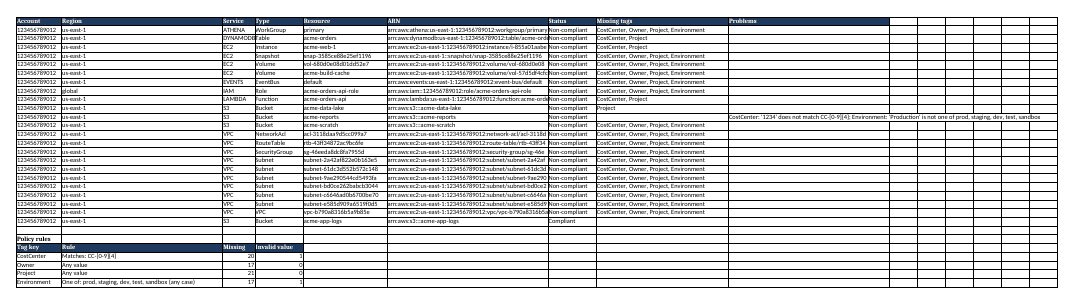
Word 文件的 Tag compliance 章節:
文件大綱:
- Cost Allocation Tag Report(標題)
- Summary
- Tag compliance
- Required tags
- Non-compliant resources
- Resources by service
- About this report
文件中的一個表格:
| Tag key | Rule | Missing | Invalid value |
|---|---|---|---|
| CostCenter | Matches: CC-[0-9]{4} | 20 | 1 |
| Owner | Any value | 17 | 0 |
| Project | Any value | 21 | 0 |
| Environment | One of: prod, staging, dev, test, sandbox (an... | 17 | 1 |
JSON 檔案:
tag_compliance_20261112_090000.json (one resource shown)
{
  "policy": "finops-cost-allocation",
  "description": "Requires CostCenter, Owner, Project and Environment so spend can be allocated.",
  "summary": {
    "checked": 23,
    "compliant": 1,
    "non_compliant": 22,
    "out_of_scope": 14,
    "percent_compliant": 4.3,
    "missing_by_key": {
      "CostCenter": 20,
      "Owner": 17,
      "Project": 21,
      "Environment": 17
    },
    "invalid_by_key": {
      "CostCenter": 1,
      "Owner": 0,
      "Project": 0,
      "Environment": 1
    }
  },
  "non_compliant_resources": [
    {
      "account": "123456789012",
      "service": "S3",
      "resource_type": "Bucket",
      "resource_id": "acme-reports",
      "arn": "arn:aws:s3:::acme-reports",
      "region": "us-east-1",
      "missing": [],
      "invalid": [
        "CostCenter: '1234' does not match CC-[0-9]{4}",
        "Environment: 'Production' is not one of prod, staging, dev, test, sandbox"
      ]
    }
  ]
}
下載範例標籤合規 JSON(9 KB,範例資料)
下一步
- 把 Word 文件發給預算負責人。其中的 Tag compliance 章節列出了不合規的資源。
- 每週跟蹤進展:在 CI/CD 中執行 InvenTag。